In this short post I will configure my router allow to NAT a single port only.
router1#conf t
Enter configuration commands, one per line. End with CNTL/Z.
router1(config)#ip nat inside source static udp 10.0.2.2 514 10.0.1.245 514 extendable
This command will allow the router accept syslog messages sent to UDP port 514 on 10.0.1.245 and translate them to UDP 514 on 10.0.2.2 which is the syslog server. Only port 514 will be available for translation.
Showing posts with label NAT. Show all posts
Showing posts with label NAT. Show all posts
Monday, October 23, 2017

Static NAT
In this post I will configure a Static NAT entry on Router1 for the Win7 host. I'll be using the network in the diagram below.
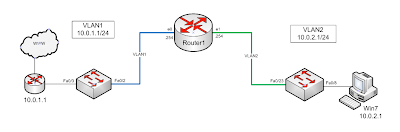
First I remove the NAT configuration from my last post.
router1(config)#no ip nat inside source list NAT pool NAT_POOL overload
Dynamic mapping in use, do you want to delete all entries? [no]: y
Now I configure NAT to map Win7 (10.0.2.1) to 10.0.1.240
router1(config)#ip nat inside source static 10.0.2.1 10.0.1.240
I verify I can reach the internet from the NAT'd host and check the NAT translations
router1(config)#do sh ip nat tran
Pro Inside global Inside local Outside local Outside global
tcp 10.0.1.240:1328 10.0.2.1:1328 208.43.202.17:80 208.43.202.17:80

First I remove the NAT configuration from my last post.
router1(config)#no ip nat inside source list NAT pool NAT_POOL overload
Dynamic mapping in use, do you want to delete all entries? [no]: y
Now I configure NAT to map Win7 (10.0.2.1) to 10.0.1.240
router1(config)#ip nat inside source static 10.0.2.1 10.0.1.240
I verify I can reach the internet from the NAT'd host and check the NAT translations
router1(config)#do sh ip nat tran
Pro Inside global Inside local Outside local Outside global
tcp 10.0.1.240:1328 10.0.2.1:1328 208.43.202.17:80 208.43.202.17:80
Dynamic NAT Using Pools
In this post I will remove my previous NAT entry and create a pool of addresses to use for NAT. I'll be using the network in the diagram below and configuring Router1.
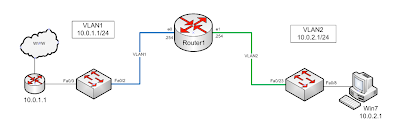
First I'll remove the previous NAT (from my last post) configuration.
router1(config)#no ip nat inside source list NAT interface Ethernet0 overload
Dynamic mapping in use, do you want to delete all entries? [no]: yes
After removing the config I verify that I cannot access the internet or ping the internet from the Win7 host.
Now I create a NAT pool with three addresses.
router1(config)#ip nat pool NAT_POOL 10.0.1.250 10.0.1.252 netmask 255.255.255.0
I already have the NAT access-list created from my previous post so I'll use that again.
router1(config)#ip nat inside source list NAT pool NAT_POOL overload
Now I access the internet from the Win7 host and verify that I am being NAT'd.
router1#sh ip nat translations
Pro Inside global Inside local Outside local Outside global
tcp 10.0.1.251:1231 10.0.2.1:1231 208.43.202.17:80 208.43.202.17:80
I can also check the NAT statistics.
router1#sh ip nat statistics
Total active translations: 41 (0 static, 41 dynamic; 41 extended)
Outside interfaces:
Ethernet0
Inside interfaces:
Ethernet1
Hits: 24714 Misses: 1339
CEF Translated packets: 25094, CEF Punted packets: 1907
Expired translations: 1666
Dynamic mappings:
-- Inside Source
[Id: 3] access-list NAT pool NAT_POOL refcount 41
pool NAT_POOL: netmask 255.255.255.0
start 10.0.1.250 end 10.0.1.252
type generic, total addresses 3, allocated 1 (33%), misses 0
Queued Packets: 0

First I'll remove the previous NAT (from my last post) configuration.
router1(config)#no ip nat inside source list NAT interface Ethernet0 overload
Dynamic mapping in use, do you want to delete all entries? [no]: yes
After removing the config I verify that I cannot access the internet or ping the internet from the Win7 host.
Now I create a NAT pool with three addresses.
router1(config)#ip nat pool NAT_POOL 10.0.1.250 10.0.1.252 netmask 255.255.255.0
I already have the NAT access-list created from my previous post so I'll use that again.
router1(config)#ip nat inside source list NAT pool NAT_POOL overload
Now I access the internet from the Win7 host and verify that I am being NAT'd.
router1#sh ip nat translations
Pro Inside global Inside local Outside local Outside global
tcp 10.0.1.251:1231 10.0.2.1:1231 208.43.202.17:80 208.43.202.17:80
I can also check the NAT statistics.
router1#sh ip nat statistics
Total active translations: 41 (0 static, 41 dynamic; 41 extended)
Outside interfaces:
Ethernet0
Inside interfaces:
Ethernet1
Hits: 24714 Misses: 1339
CEF Translated packets: 25094, CEF Punted packets: 1907
Expired translations: 1666
Dynamic mappings:
-- Inside Source
[Id: 3] access-list NAT pool NAT_POOL refcount 41
pool NAT_POOL: netmask 255.255.255.0
start 10.0.1.250 end 10.0.1.252
type generic, total addresses 3, allocated 1 (33%), misses 0
Queued Packets: 0
Basic NAT with Overload
In this post I will configure basic NAT with overload to NAT addresses from the 10.0.2.0/24 network (inside) to the outside interface Ethernet 0.
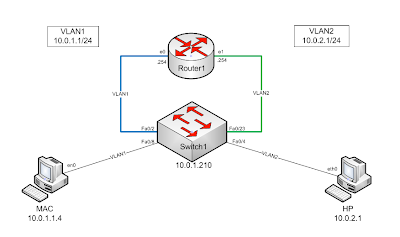
I have already configured DHCP to hand out addresses to computers on the 10.0.2.0/24 network. I have also configured the router to be the DNS server for those computers.
I create a standard access-list defining the addresses I want to NAT.
router1(config)#ip access-list standard NAT
router1(config-std-nacl)#permit 10.0.2.0 0.0.0.255
router1(config-std-nacl)#end
I use a show command to view the access-list.
router1#sh ip access-lists
Standard IP access list NAT
10 permit 10.0.2.0, wildcard bits 0.0.0.255
I check my interfaces to make sure I know which I want to name as inside and outside.
router1(config)#do show ip interface brief
Interface IP-Address OK? Method Status Protocol
FastEthernet1 unassigned YES unset up up
FastEthernet2 unassigned YES unset down down
FastEthernet3 unassigned YES unset down down
FastEthernet4 unassigned YES unset down down
Ethernet0 10.0.1.254 YES NVRAM up up
Ethernet1 10.0.2.254 YES NVRAM up up
I name the interfaces Inside and Outside
router1(config)#interface ethernet 0
router1(config-if)#ip nat outside
router1(config-if)#exit
router1(config)#interface ethernet 1
router1(config-if)#ip nat inside
router1(config-if)#exit
I Configue NAT to translate any addresses in the source access-list to the outside interface with overload.
router1(config)#ip nat inside source list NAT interface ethernet 0 overload
To test the configuration I connect to a website with a client that is behind the inside interface. Then I check the NAT translations on my router.
router1#sh ip nat translations
Pro Inside global Inside local Outside local Outside global
udp 10.0.1.254:123 10.0.2.1:123 207.46.232.182:123 207.46.232.182:123
tcp 10.0.1.254:1149 10.0.2.1:1149 174.36.30.70:443 174.36.30.70:443

I have already configured DHCP to hand out addresses to computers on the 10.0.2.0/24 network. I have also configured the router to be the DNS server for those computers.
I create a standard access-list defining the addresses I want to NAT.
router1(config)#ip access-list standard NAT
router1(config-std-nacl)#permit 10.0.2.0 0.0.0.255
router1(config-std-nacl)#end
I use a show command to view the access-list.
router1#sh ip access-lists
Standard IP access list NAT
10 permit 10.0.2.0, wildcard bits 0.0.0.255
I check my interfaces to make sure I know which I want to name as inside and outside.
router1(config)#do show ip interface brief
Interface IP-Address OK? Method Status Protocol
FastEthernet1 unassigned YES unset up up
FastEthernet2 unassigned YES unset down down
FastEthernet3 unassigned YES unset down down
FastEthernet4 unassigned YES unset down down
Ethernet0 10.0.1.254 YES NVRAM up up
Ethernet1 10.0.2.254 YES NVRAM up up
I name the interfaces Inside and Outside
router1(config)#interface ethernet 0
router1(config-if)#ip nat outside
router1(config-if)#exit
router1(config)#interface ethernet 1
router1(config-if)#ip nat inside
router1(config-if)#exit
I Configue NAT to translate any addresses in the source access-list to the outside interface with overload.
router1(config)#ip nat inside source list NAT interface ethernet 0 overload
To test the configuration I connect to a website with a client that is behind the inside interface. Then I check the NAT translations on my router.
router1#sh ip nat translations
Pro Inside global Inside local Outside local Outside global
udp 10.0.1.254:123 10.0.2.1:123 207.46.232.182:123 207.46.232.182:123
tcp 10.0.1.254:1149 10.0.2.1:1149 174.36.30.70:443 174.36.30.70:443
Subscribe to:
Posts (Atom)